For shops, online sellers and restaurants in Myanmar မြန်မာနိုင်ငံရှိ ဆိုင်များ၊ online seller များနှင့် စားသောက်ဆိုင်များအတွက်
Ask for a trial workspace before choosing a plan Plan မရွေးခင် trial workspace လျှောက်ထားနိုင်သည် Use it for retail inventory, online orders or dine-in QR ordering retail stock၊ online အော်ဒါနှင့် ဆိုင်ထိုင် QR အော်ဒါများအတွက် အသုံးပြုနိုင်သည် Know what is selling, what is left and which bills are still open ဘာရောင်းနေလဲ၊ ဘာလက်ကျန်ရှိလဲ၊ ဘယ်ဘီလ်မပိတ်သေးလဲကို ချက်ချင်းသိနိုင်သည်

Shop sales and restaurant QR orders
kept under control.
ဆိုင်အရောင်းနှင့် စားသောက်ဆိုင် QR အော်ဒါများကို
တစ်နေရာတည်းမှာ ထိန်းပါ။

StockEasy is for shops that need real stock and receipts, and restaurants that need QR table ordering. Add products or menu items, sell from POS, approve QR orders, send them to the kitchen, close bills and check daily profit without chasing paper records. StockEasy သည် stock နှင့် ဘောက်ချာကို သေချာထိန်းချင်သော ဆိုင်များ၊ QR စားပွဲအော်ဒါလိုအပ်သော စားသောက်ဆိုင်များအတွက် ဖြစ်သည်။ product သို့မဟုတ် menu item ထည့်ပါ၊ POS မှ ရောင်းပါ၊ QR အော်ဒါကို counter မှ အတည်ပြုပါ၊ kitchen သို့ ပို့ပါ၊ ဘီလ်ပိတ်ပါ၊ နေ့ကုန်အမြတ်ကို စာရွက်လိုက်ရှာစရာမလိုဘဲ ကြည့်နိုင်သည်။

English and Burmese interfaceEnglish နှင့် မြန်မာဘာသာ အသုံးပြုနိုင်သည် Works on phone, tablet and computerဖုန်း၊ tablet နှင့် ကွန်ပျူတာတွင် အသုံးပြုနိုင်သည် Retail and restaurant plans use separate limitsretail နှင့် restaurant plan limit များ သီးခြားဖြစ်သည်

Retail shops, online sellers and restaurants can all run with StockEasy. Retail ဆိုင်၊ online seller နှင့် စားသောက်ဆိုင်လုပ်ငန်းများကို StockEasy မှာ စီမံနိုင်ပါတယ်။

Retail & Online Sellingretail နှင့် online ရောင်းချမှု

Clothing shops, cosmetics, grocery, boutiques and wholesaleအဝတ်အထည်ဆိုင်၊ cosmetics၊ grocery၊ boutique နှင့် လက္ကားလုပ်ငန်းများ

  • Keep product name, category, brand, SKU, barcode, size and color in orderကုန်ပစ္စည်းအမည်၊ category၊ brand၊ SKU၊ barcode၊ size နှင့် color ကို စနစ်တကျ ထားနိုင်သည်
  • Stock in, stock out and opening stock are recorded with historystock in၊ stock out နှင့် opening stock များကို မှတ်တမ်းနှင့်တကွ သိမ်းထားနိုင်သည်
  • Sales reduce stock automatically and receipts can be printed or sharedအရောင်းလုပ်ပြီးသည်နှင့် stock အလိုအလျောက် လျော့သွားပြီး ဘောက်ချာ print/share ပြုလုပ်နိုင်သည်
  • Owned e-commerce website lets customers browse products and place ordersကိုယ်ပိုင် e-commerce website မှ customer များသည် ကုန်ပစ္စည်းကြည့်ပြီး အော်ဒါတင်နိုင်သည်
  • Profit, expenses and inventory valuation are available for reviewအမြတ်၊ ကုန်ကျစရိတ်နှင့် inventory တန်ဖိုးကို ပြန်စစ်နိုင်သည်

Restaurant QR Orderingစားသောက်ဆိုင် QR အော်ဒါစနစ်

Restaurants, cafés, teashops and table-service food businessesစားသောက်ဆိုင်၊ café၊ လက်ဖက်ရည်ဆိုင်နှင့် စားပွဲဝန်ဆောင်မှုလုပ်ငန်းများ

  • Each table gets a QR code, so guests can order from phone without waiting for a menuစားပွဲတိုင်းတွင် QR code ရှိပြီး ဧည့်သည်များသည် menu စောင့်စရာမလိုဘဲ ဖုန်းမှအော်ဒါတင်နိုင်သည်
  • Counter staff can check and approve orders before they reach the kitchencounter ဝန်ထမ်းသည် kitchen သို့မပို့မီ အော်ဒါကို စစ်ပြီး အတည်ပြုနိုင်သည်
  • Kitchen screen shows new, cooking and completed orders clearlykitchen screen တွင် အော်ဒါအသစ်၊ ပြင်ဆင်နေသော အော်ဒါနှင့် ပြီးသော အော်ဒါများကို ရှင်းလင်းစွာ မြင်နိုင်သည်
  • Tables, order sessions and waiter calls stay connectedစားပွဲ၊ order session နှင့် waiter call များကို အသုံးပြုနိုင်သည်
  • All orders from one table are combined into one bill at checkoutစားပွဲတစ်ခုမှ အော်ဒါအားလုံးကို checkout တွင် ဘီလ်တစ်စောင်တည်း ပေါင်းထုတ်နိုင်သည်

Daily tools for selling, ordering, billing and checking profit. နေ့စဉ် ရောင်းချမှု၊ အော်ဒါ၊ ဘီလ်နှင့် အမြတ်စစ်ဆေးမှုအတွက် လိုအပ်သော tool များ။

The main screens follow the daily work: add items, serve customers, collect payment and review the numbers later. Owners get reports, staff get only the tools they need. အဓိက screen များသည် နေ့စဉ်လုပ်ငန်းအတိုင်း သွားသည်။ item ထည့်ပါ၊ customer ကို ဝန်ဆောင်မှုပေးပါ၊ ငွေကောက်ပါ၊ နောက်မှ report ပြန်စစ်ပါ။ ပိုင်ရှင်က report ကြည့်နိုင်ပြီး staff သည် လိုအပ်သော tool များကိုသာ အသုံးပြုနိုင်သည်။

Products, Menu Items & Optionsကုန်ပစ္စည်း၊ menu item နှင့် option များ

Retail can use SKU, barcode, size and color variants. Restaurants can add menu items with price options such as Chicken, Pork, Small or Large.retail အတွက် SKU၊ barcode၊ size နှင့် color မျိုးကွဲများ အသုံးပြုနိုင်သည်။ စားသောက်ဆိုင်အတွက် Chicken၊ Pork၊ Small၊ Large စသော price option များပါသော menu item များ ထည့်နိုင်သည်။

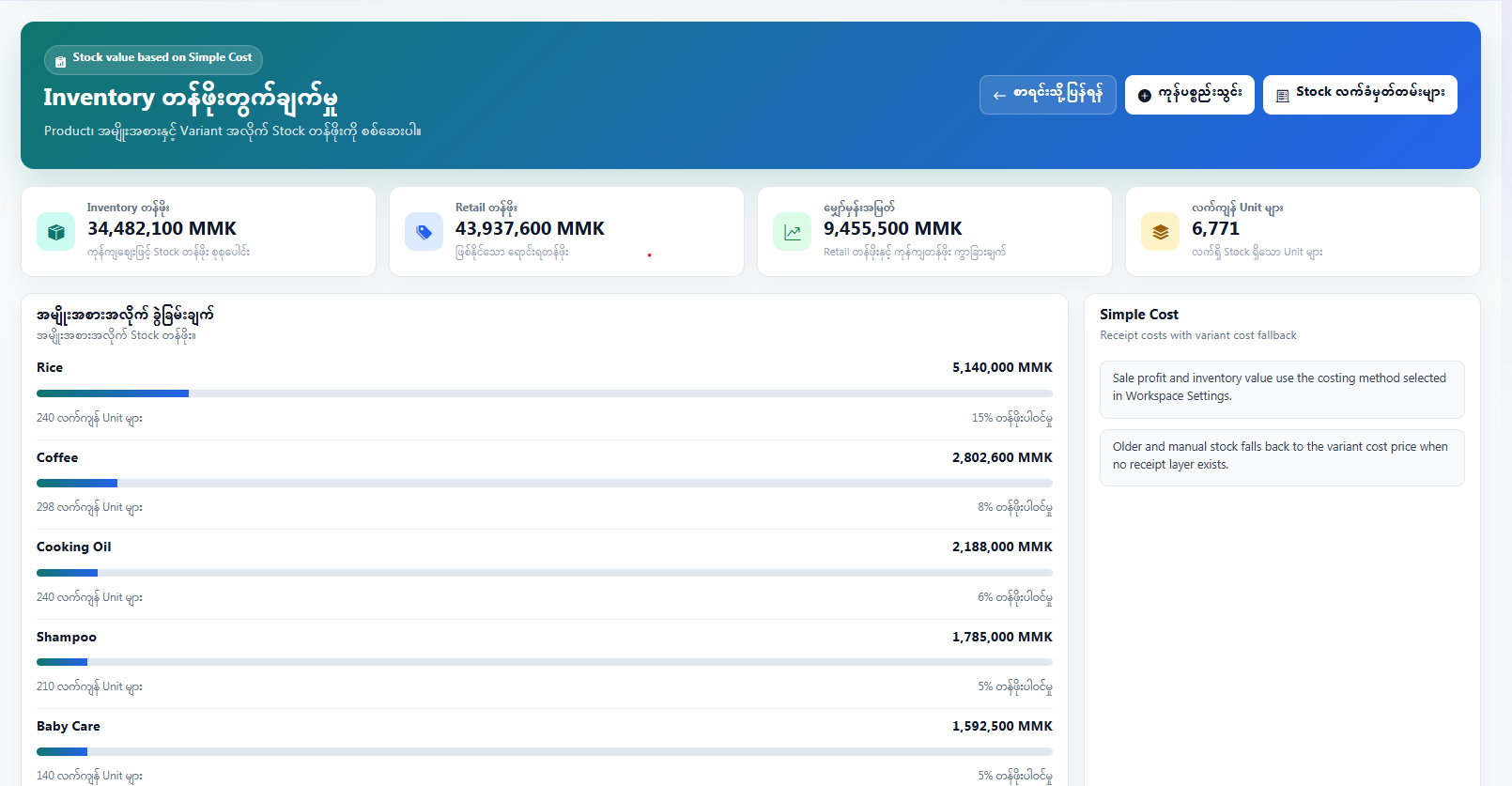
Stock & Cost Controlstock နှင့် cost ထိန်းချုပ်မှု

Track stock in, stock out, purchase receipts, costing method and inventory value. Useful for shops that need to know real stock and cost.stock in၊ stock out၊ purchase receipt၊ costing method နှင့် inventory value ကို ကြည့်နိုင်သည်။ လက်ကျန်နှင့် cost ကို တိတိကျကျ သိချင်သော ဆိုင်များအတွက် အသုံးဝင်သည်။

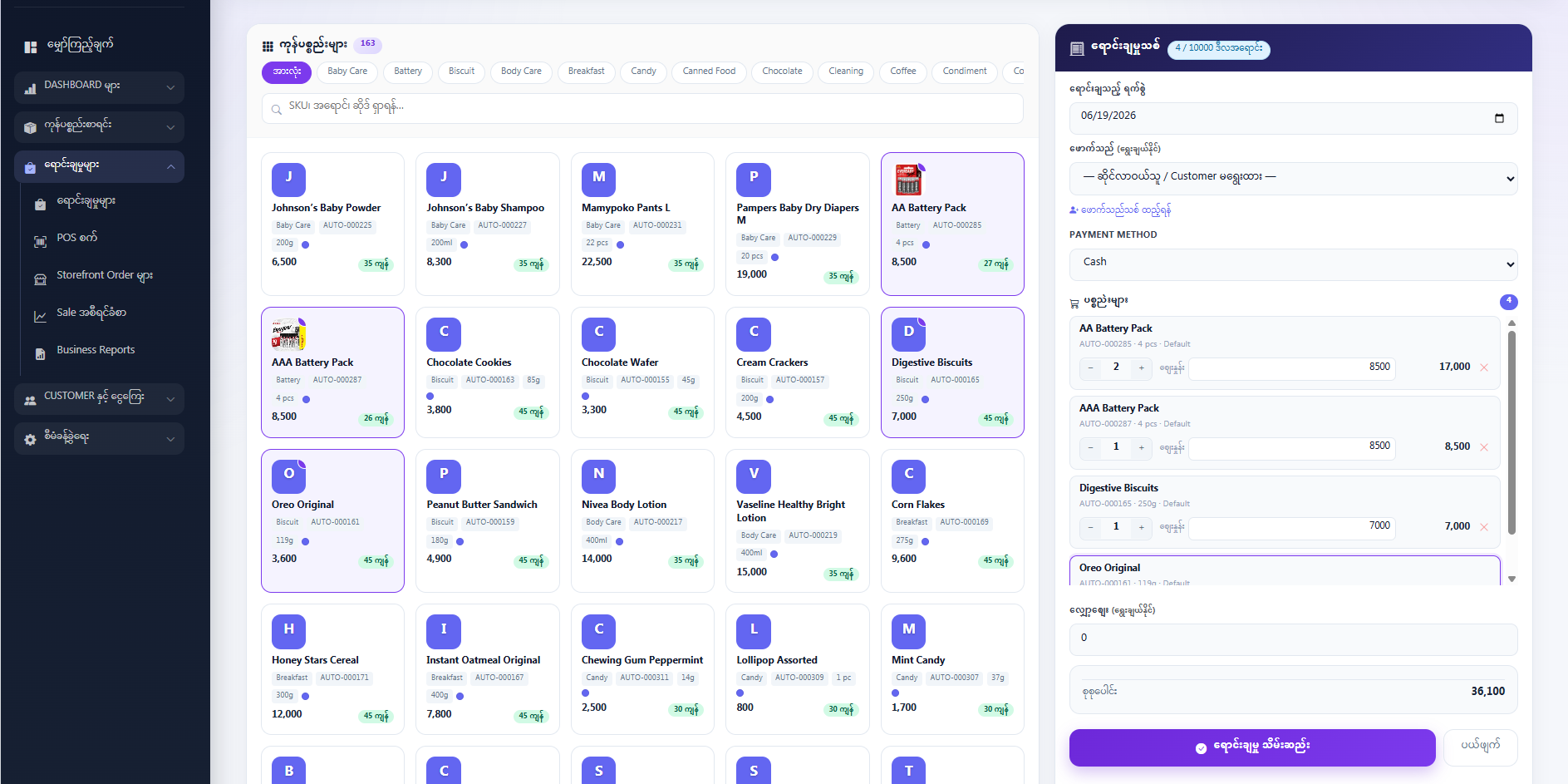
POS, Receipts & Customer OrdersPOS၊ ဘောက်ချာနှင့် customer အော်ဒါများ

Create sales, scan barcodes, apply discounts, print receipts and keep customer order history. Stock is deducted automatically when retail sales are recorded.အရောင်းလုပ်နိုင်သည်၊ barcode scan ဖတ်နိုင်သည်၊ discount ထည့်နိုင်သည်၊ ဘောက်ချာ print ထုတ်နိုင်ပြီး customer order history ကို သိမ်းထားနိုင်သည်။ retail sale မှတ်တမ်းတင်သည့်အခါ stock အလိုအလျောက် လျော့သွားသည်။

QR Table OrderingQR စားပွဲအော်ဒါ

Customers scan the table QR, choose menu options and submit orders from their phone. Sold-out and hidden items are controlled from the menu admin screen.customer သည် စားပွဲ QR ကို scan ဖတ်ပြီး ဖုန်းမှ menu option ရွေးကာ အော်ဒါတင်နိုင်သည်။ sold-out နှင့် hidden item များကို menu admin screen မှ ထိန်းနိုင်သည်။

Counter, Kitchen & Table Billscounter၊ kitchen နှင့် စားပွဲဘီလ်

Counter staff approve orders, kitchen staff update preparation status, and the counter closes all table orders into one bill.counter ဝန်ထမ်းက အော်ဒါအတည်ပြုနိုင်သည်၊ kitchen ဝန်ထမ်းက ပြင်ဆင်မှု status update လုပ်နိုင်သည်၊ counter မှ စားပွဲအော်ဒါအားလုံးကို ဘီလ်တစ်စောင်တည်း ပိတ်နိုင်သည်။

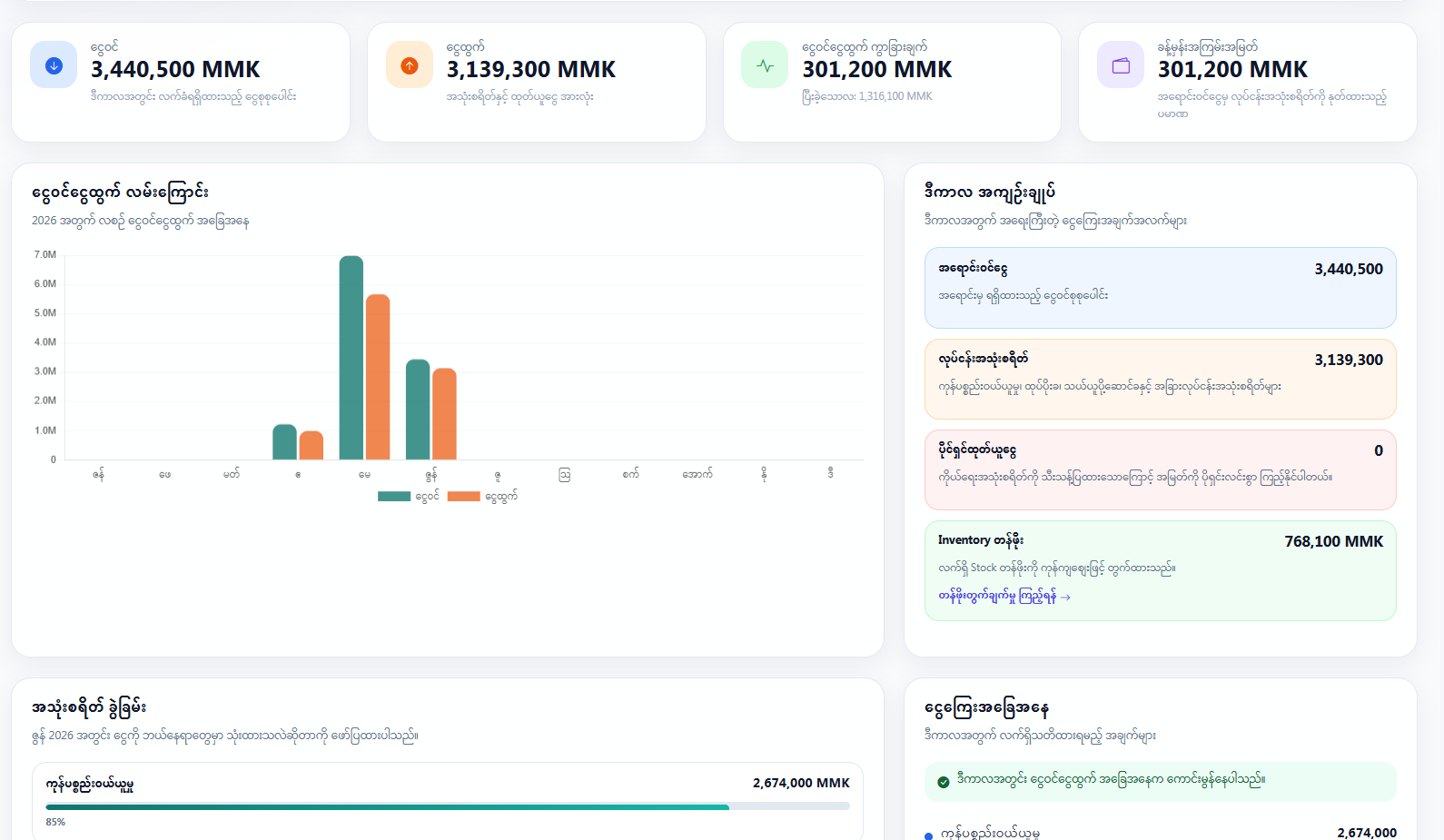
Reports, Profit & Staff Accessreport၊ အမြတ်နှင့် staff access

Review sales reports, profit, expenses and activity logs. Add staff accounts and keep each business workspace separate and private.sales report၊ အမြတ်၊ ကုန်ကျစရိတ်နှင့် activity log များကို ပြန်ကြည့်နိုင်သည်။ staff account များ ထည့်နိုင်ပြီး လုပ်ငန်း workspace တစ်ခုစီကို သီးခြားလုံခြုံစွာ ထားနိုင်သည်။

We prepare the workspace around your business type. သင့်လုပ်ငန်းအမျိုးအစားအလိုက် workspace ကို ပြင်ဆင်ပေးသည်။

Tell us whether you run retail or restaurant. We create the right plan, features and first admin account, then your team can start adding real items. သင့်လုပ်ငန်းသည် retail လား၊ restaurant လား ပြောပေးပါ။ သင့်တော်သော plan၊ feature နှင့် ပထမဆုံး admin account ကို ပြင်ဆင်ပေးပြီးနောက် သင့် team သည် item အမှန်များကို စတင်ထည့်နိုင်သည်။

1

Send your business detailsလုပ်ငန်းအချက်အလက် ပို့ပါ

Choose Retail or Restaurant and tell us your business name, contact person and what you sell or serve. Retail သို့မဟုတ် Restaurant ကိုရွေးပြီး လုပ်ငန်းအမည်၊ ဆက်သွယ်ရမည့်သူနှင့် သင်ရောင်းချသည့် ကုန်ပစ္စည်း သို့မဟုတ် ဝန်ဆောင်မှုကို ဖြည့်ပါ။

2

We set up the right workspaceသင့်တော်သော workspace ပြင်ဆင်ပေးပါမည်

Retail workspaces get product, stock and sales tools. Restaurant workspaces get menu, table, counter, kitchen and bill tools. Retail workspace တွင် product၊ stock နှင့် sales tool များ ပါမည်။ Restaurant workspace တွင် menu၊ table၊ counter၊ kitchen နှင့် bill tool များ ပါမည်။

3

Start daily operationနေ့စဉ်လုပ်ငန်း စတင်ပါ

Add products or menu items, invite staff, scan barcodes, print receipts, approve QR orders and review reports when the day ends. ကုန်ပစ္စည်း သို့မဟုတ် menu item များထည့်ပါ၊ staff ကိုဖိတ်ပါ၊ barcode scan ဖတ်ပါ၊ ဘောက်ချာ print ထုတ်ပါ၊ QR အော်ဒါများ အတည်ပြုပါ၊ နေ့ကုန်တွင် report ပြန်ကြည့်ပါ။

From item setup to final bill, the records stay connected. item ထည့်ခြင်းမှ နောက်ဆုံးဘီလ်အထိ မှတ်တမ်းများကို ဆက်စပ်ထားသည်။

Retail sales update stock and reports. Restaurant orders move from QR menu to counter, kitchen and table bill. Retail sale များသည် stock နှင့် report ကို update လုပ်သည်။ Restaurant order များသည် QR menu မှ counter၊ kitchen နှင့် table bill သို့ ဆက်သွားသည်။

Retail Items SKU
Cotton Shirt12 variants
Denim Jacket8 variants
Face Cream3 sizes
Table Orders QR
CustomerOrder
CounterApprove
KitchenCook
Bills & Reports MMK

Questions business owners usually ask မေးလေ့ရှိသော မေးခွန်းများ

Short answers before you decide whether StockEasy fits your shop or restaurant. StockEasy သည် သင့်ဆိုင် သို့မဟုတ် စားသောက်ဆိုင်နှင့် ကိုက်မကိုက် မဆုံးဖြတ်မီ သိထားသင့်သော အဖြေတိုများ။

What can I actually do with StockEasy?StockEasy နဲ့ တကယ်ဘာတွေ လုပ်နိုင်မလဲ?
You can manage products or menu items, record sales, print receipts, review profit and give staff their own accounts. Restaurants can also use QR ordering, counter approval, kitchen display and table bills. ကုန်ပစ္စည်း သို့မဟုတ် menu item များ စီမံနိုင်သည်၊ အရောင်းမှတ်နိုင်သည်၊ ဘောက်ချာ print ထုတ်နိုင်သည်၊ အမြတ်ပြန်စစ်နိုင်သည်၊ staff account များ ထည့်နိုင်သည်။ စားသောက်ဆိုင်များအတွက် QR ordering၊ counter approval၊ kitchen display နှင့် table bill များပါ အသုံးပြုနိုင်သည်။
How does the restaurant QR order flow work?စားသောက်ဆိုင် QR အော်ဒါ flow ဘယ်လိုအလုပ်လုပ်သလဲ?
Guests scan the table QR and order from their phone. The counter checks the order, sends it to the kitchen, kitchen staff update the status, and the counter closes the table bill when customers pay. ဧည့်သည်များသည် စားပွဲ QR ကို scan ဖတ်ပြီး ဖုန်းမှ အော်ဒါတင်သည်။ counter မှ အော်ဒါကို စစ်ပြီး kitchen သို့ပို့သည်။ kitchen ဝန်ထမ်းက status update လုပ်သည်။ customer ငွေရှင်းသောအခါ counter မှ စားပွဲဘီလ်ကို ပိတ်သည်။
Do I need a separate app?သီးခြား app လိုပါသလား?
No. Staff and owners can use StockEasy from a browser on phone, tablet or computer. Restaurant customers also order from the browser after scanning the QR code. မလိုပါ။ ပိုင်ရှင်နှင့် ဝန်ထမ်းများသည် ဖုန်း၊ tablet သို့မဟုတ် ကွန်ပျူတာ browser မှ အသုံးပြုနိုင်သည်။ စားသောက်ဆိုင် customer များလည်း QR scan ဖတ်ပြီး browser မှ အော်ဒါတင်နိုင်သည်။
Is there a free plan or trial?အခမဲ့ plan သို့မဟုတ် စမ်းသုံးခွင့် ရှိပါသလား?
Yes. Retail and restaurant plans are handled separately. Send an inquiry and we will prepare the available free, trial or paid plan that fits your business type. ရှိပါသည်။ retail plan နှင့် restaurant plan ကို သီးခြားထားသည်။ လျှောက်လွှာပို့ပါ။ သင့်လုပ်ငန်းအမျိုးအစားနှင့် ကိုက်ညီသော free၊ trial သို့မဟုတ် paid plan ကို ပြင်ဆင်ပေးပါမည်။
Does it work on mobile?မိုဘိုင်းဖုန်းတွင် အသုံးပြုနိုင်ပါသလား?
Yes. The admin screens, restaurant counter, kitchen screen and customer QR menu are responsive. For busy counters and kitchens, a larger tablet or monitor is easier to use. ရပါသည်။ admin screen၊ restaurant counter၊ kitchen screen နှင့် customer QR menu များသည် responsive ဖြစ်သည်။ counter နှင့် kitchen တွင် အလုပ်များပါက tablet အကြီး သို့မဟုတ် monitor အသုံးပြုလျှင် ပိုလွယ်ကူသည်။
Is it available in Burmese?မြန်မာဘာသာဖြင့် ရရှိနိုင်ပါသလား?
Yes. The main interface supports English and Burmese. You can switch language from the page header. ရပါသည်။ အဓိက interface များတွင် English နှင့် မြန်မာဘာသာ နှစ်မျိုး ပါရှိသည်။ page header မှ ဘာသာစကား ပြောင်းနိုင်သည်။
Is my business data private?ကျွန်ုပ်၏ လုပ်ငန်းဒေတာ လုံခြုံပါသလား?
Yes. Each tenant gets a separate workspace, and staff only see data for their own business. Access is controlled by account and plan features. လုံခြုံပါသည်။ tenant တစ်ခုစီတွင် သီးခြား workspace ရှိပြီး staff များသည် မိမိလုပ်ငန်း၏ data ကိုသာ မြင်နိုင်သည်။ Access ကို account နှင့် plan feature အလိုက် ထိန်းချုပ်ထားသည်။
How do I get started?ဘယ်လို စတင်ရမလဲ?
Fill out the form below. After review, we create your workspace, assign the correct retail or restaurant plan and send login details to your email. အောက်ပါ form ကို ဖြည့်ပါ။ စစ်ဆေးပြီးနောက် workspace ဖန်တီးပေးပြီး retail သို့မဟုတ် restaurant plan မှန်ကန်စွာ ချိတ်ဆက်ကာ login အချက်အလက်ကို သင့် email သို့ ပို့ပေးပါမည်။
Tell us what kind of business you run. သင့်လုပ်ငန်းအမျိုးအစားကို ပြောပြပါ။

Send your shop or restaurant details. We will review the request, prepare the correct workspace and send the first admin login after approval. သင့်ဆိုင် သို့မဟုတ် စားသောက်ဆိုင်အချက်အလက်များကို ပို့ပါ။ လျှောက်လွှာကို စစ်ဆေးပြီး သင့်တော်သော workspace ကို ပြင်ဆင်ကာ အတည်ပြုပြီးနောက် ပထမဆုံး admin login ကို ပို့ပေးပါမည်။

Email Usအီးမေးလ်ပို့ပါ
stockeasymyanmar@gmail.com
Call Usဖုန်းဆက်ပါ
+95 9 787830350
Locationတည်နေရာ
Yangon, Myanmarရန်ကုန်၊ မြန်မာနိုင်ငံ

Apply for a StockEasy workspaceStockEasy workspace အတွက် လျှောက်ထားပါ

Required fields are marked with *. * ပါသောအကွက်များကို မဖြစ်မနေ ဖြည့်ရပါမည်။
Choose Restaurant if you need QR menu, table bills, counter and kitchen screens. Choose Retail if you need stock, products, POS and receipts. QR menu၊ စားပွဲဘီလ်၊ counter နှင့် kitchen screen လိုအပ်ပါက Restaurant ကိုရွေးပါ။ stock၊ product၊ POS နှင့် ဘောက်ချာလိုအပ်ပါက Retail ကိုရွေးပါ။